How to read a timegrapher
Rate, amplitude and beat error, explained for people new to watch timing. Last updated November 25, 2026.
A timegrapher listens to a mechanical watch tick and turns that sound into three numbers and a picture. Once you know what each one means, you can tell whether a watch runs fast or slow, whether it is healthy, and what to fix first. It all applies to the timegrapher in Watch Sim too, where you can practise on a virtual bench.
This guide is general education. It is no substitute for a watchmaker's judgement on a real watch, and the ranges below are rules of thumb, not specifications for any one movement.
What a timegrapher measures
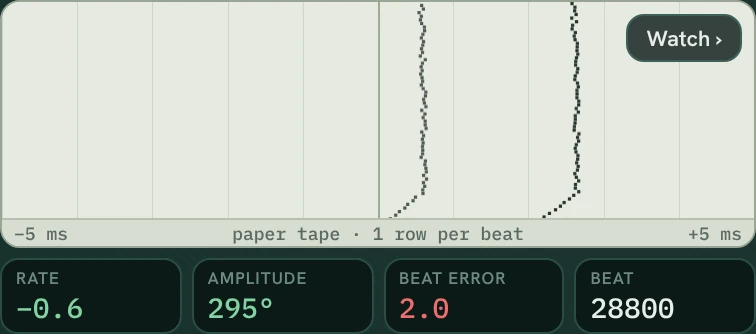
A microphone or pickup on the watch records each tick. The software compares the timing of those ticks with a perfect reference and shows three readings: rate, amplitude and beat error. Most machines also draw a trace, a pair of lines of dots (one for the tick, one for the tock) that makes problems easy to see.
Rate: is the watch fast or slow?
Rate is how much the watch gains or loses, in seconds per day. A reading of +10 means it gains about 10 seconds a day, and -10 means it loses about 10.
On the trace, a rate of zero draws lines that run straight across. Any error makes the lines slant, and the steeper the slant, the bigger the error. Which direction means fast and which means slow depends on the machine, so check yours. For a sense of scale, a chronometer certified by COSC must average between -4 and +6 seconds per day when tested.
Amplitude: how hard is the balance swinging?
Amplitude is how far the balance wheel swings to each side, measured in degrees. Many healthy movements read roughly 270 to 310 degrees when lying flat, and a little lower when held upright. It also depends on how wound the watch is, so a freshly wound watch reads higher.
Low amplitude usually points to friction: dirty or dried-out oil, a worn part, or a mainspring that is nearly run down. Regulating cannot fix it, so look at it before anything else. An unusually high reading can make some movements knock, where the balance hits its own stop.
Beat error: are the tick and tock even?
Beat error is the difference, in milliseconds, between the tick interval and the tock interval. When it is zero the two are even. On the trace the two lines drift apart vertically, so the bigger the gap, the larger the beat error. A reading well under about half a millisecond is generally considered good. A large one means the balance is out of beat, which a watchmaker corrects by adjusting how the hairspring is set so the balance sits evenly either side of centre.
Beat rate: set it to match the watch
Every movement beats at a fixed speed, given in vibrations per hour (vph). Common speeds are 18,000, 21,600, 28,800 and 36,000. Set the timegrapher to the watch's beat rate. If it is wrong, the trace will not settle into clean lines and the readings mean nothing.
Why the six positions matter
Gravity pulls on the balance differently depending on how the watch is lying, so rate and amplitude change with position. Watchmakers test six: dial up, dial down, crown up, crown down, crown left and crown right. A big difference between positions can point to a problem with the balance's poise or pivots. A watch that is perfect on the bench can run differently on your wrist, because you never hold it still.
What to fix first
- Wind the watch fully and set the timegrapher to its beat rate.
- Check amplitude. If it is low, service the movement before adjusting anything.
- Check beat error and correct it if it is large.
- Adjust the rate with the regulator (index) lever. Moving it toward the fast side (+ or F) speeds the watch up, and toward the slow side (- or S) slows it down.
- Re-check the watch in several positions.
If the rate is erratic or the watch suddenly runs very fast, magnetism is a common cause: the hairspring coils cling together and shorten the spring. A watchmaker demagnetises the watch and tests again.
Practise it in Watch Sim
Watch Sim has a working timegrapher. Slide the regulator, watch the tape straighten, check six positions and send your watch to the timing trials, with no real watch at risk.
Get Watch Sim on the App Store
Common questions
What is a good timegrapher reading?
There is no single number. As a rule of thumb, look for a small rate error, amplitude in the 270 to 310 degree range when flat, and beat error well under half a millisecond. Different movements and ages have different normal values.
Why is my amplitude low?
Most often friction or a low mainspring wind. Wind the watch fully and test again. If it is still low, the movement probably needs cleaning and fresh oil.
Why does the rate change between positions?
Gravity acts on the balance differently in each position. Small differences are normal. Large ones are worth investigating.
Can I learn this without a real timegrapher?
Yes. Watch Sim simulates one, so you can see how each adjustment changes the trace and the readings.